Plotting and PDF Publishing Standards for DOT Plan Submittals
Vector output, file limits, and sheet rules differ by agency, so build them in early.

DOT plan submittal standards govern more than how drawings look. They define whether an agency can review, reproduce, navigate, and legally rely on a PDF plan set. The technical rules share a common logic, but their limits vary by jurisdiction. First-time compliance depends on building those differences into production before publishing, rather than discovering them when a submission is rejected.
Why DOT PDF submittal standards exist and what they are trying to protect
Electronic submission is a required delivery format. North Dakota Department of Transportation’s May 2026 CADD Standards call for PDF plan sets on all projects. Wisconsin DOT designates e-plans as the only plan submittal format. Ohio DOT requires project managers to create the plan package documentation and submit it electronically as a single PDF.
That status explains the technical controls placed on it. Reviewers need to open, mark up, search, measure, archive, and legally reference the document they receive. Reproducibility is part of that obligation because a drawing must still be usable when it is viewed or printed in a different setting. Agencies state their rules in different ways, but they protect the same functions. A PDF that resembles the intended drawing but prevents those functions is not an adequate deliverable.
Vector format as the foundational requirement, and why raster submissions fail
A firm can submit a scan-to-PDF that looks like a complete plan set at ordinary viewing size, yet supplies only an image of the drawing. That distinction becomes apparent during review. Lines degrade when enlarged, text cannot be searched as native text, and the file does not provide the measurement capability expected of the plan set. The reviewer receives something recognizable but technically unsuitable.
ODOT’s Location & Design Manual, Volume 3 requires all PDF pages except the Title Sheet to be in vector format and states that PDF files shall not be rasterized. ODOT also reserves the right to reject electronic data or files that do not meet its requirements. Rejected files must be corrected before resubmission. The exception for the Title Sheet does not extend to the rest of the drawings.
Vector content also supports efficient file management. It preserves drawing quality when enlarged and is preferred to raster PDF for reducing file size without sacrificing that quality. Compliance and file management point in the same direction here. The useful distinction is not between a PDF that opens and one that does not, but between a document that preserves the drawing’s usable content and one that substitutes a picture of it.
Resolution, file size, and the per-jurisdiction limits that determine how plan sets must be divided
NDDOT guidance gives 600 dpi as the PDF creation target, consistent with general DOT practice. That setting does not replace the requirement to preserve vector content. Even a correctly published PDF may be too large for the agency that receives it. Format, resolution, and packaging must all be satisfied together.
NDDOT’s CADD Standards require individual PDF files used for electronic distribution to be less than 300 MB. Larger plan sets must be divided into separate volumes. New York State Department of State’s Electronic Plan Submittal Standards, revised 8/12/2025, permit sheets to be bundled into PDF files not exceeding 20 MB. The New York rules also impose a transmission constraint. A single PDF or multiple PDFs totaling more than 20 MB in one email will be rejected by the email server.
The 20 MB limit changes production planning substantially. It is not enough to divide a large set into individually acceptable files and then attach all of them to one message. Although NY DOS is not a DOT, its requirements illustrate the range of constraints that firms encounter across public-agency submissions. A set prepared for one destination can be far too large for another.
The production response is to plan volume divisions before submission day. Where a set would exceed the applicable limit, it should be divided rather than compressed in ways that degrade vector content or reduce resolution. This preserves the technical quality already established.
Sheet size, orientation, scale, and the drawing presentation rules that govern every sheet
File-level compliance does not establish that individual sheets are acceptable. Wisconsin DOT’s FDM 15-05 calls for 11x17-inch PDF documents in landscape orientation, while other WisDOT programs also allow 22x34 or 24x36. NY DOS requires a minimum sheet size of 22"x34". A firm cannot use one agency’s sheet template for another just because both accept PDF files.
ODOT’s January 2026 manual specifies plan sheet format and dimensions in section 1201. Such presentation requirements reach beyond the outer dimensions of the page to the drafting conventions that govern the drawing within it. Scale introduces another layer of control. NY DOS requires a graphic scale bar on every sheet and a separate graphic scale for the applicable detail when a sheet contains more than one scale. It also explicitly prohibits “Fit to Page” output because the output scale must be maintained.
Readability must survive those scale decisions. Georgia DOT’s December 2025 Plan Presentation Guide specifies minimum text size tied to the drawing scale. A drawing can fit its prescribed page and still fail the presentation standard if its lettering does not meet the scale-related minimum.
Reserved space also belongs in the sheet design. NY DOS requires a blank area for the approval batch stamp that is at least a 3-inch square and sits inside a ¾-inch top margin and a 3-inch top right-side margin. The title block must stay out of that area. These dimensions show how granular submission standards can become. Compliance reaches into both the layout of each sheet and the settings used to publish the file.
Font embedding, PDF version, and searchability requirements
A correct print preview cannot establish every property of a PDF. Font embedding, PDF version, and searchability cannot be seen on the page, so a file can look complete while failing to meet a technical requirement. At a minimum, files must have embedded fonts and use PDF Version 1.7. Text-based documents should also be searchable, especially specifications, notes sheets, and sheets with a lot of text. These properties require attention beyond visual inspection.
Correct publishing from the CADD platform can preserve vector content, embed fonts, and produce the required PDF version together. A non-compliant PDF driver or a flattening step may fail to preserve those properties.
File naming conventions and sheet organization requirements across DOTs
An otherwise compliant submission requires correct file naming and organization to be received, routed, and reviewed. NDDOT’s May 2026 standards cover File Naming Conventions, updated November 2025, in section 2.4. The conventions must be applied to the files actually delivered. A technically sound PDF does not compensate for an incorrectly organized package.
NY DOS makes the relationship between names and navigation concrete. Document file names must be limited to 30 characters, and each file name should appear in the cover sheet index. The index connects the named sheets to their PDF bundles. Bookmarks and hyperlinks are strongly encouraged and should follow the index sequence. Together, these elements let the reviewer move from the cover sheet to the appropriate file and then through the drawing set without competing organizational schemes.
Volume divisions make that relationship especially important. When a plan set is split across several PDFs, the cover sheet index must still show where its sheets belong. The City of Scottsdale uses Bluebeam for its ability to “roll up” plans, view redlines, and limit file sizes. That example links package organization to the review platform. Across jurisdictions, the governing principle remains navigability, because individually correct sheets are insufficient if the reviewer cannot reliably locate them.
Digital signatures and professional seal requirements in electronic submittals
Electronic delivery changes how required professional accountability is documented. NDDOT guidance notes that printed plan sheets are not required on digital signature pilot projects. In that setting, accepted digital signatures remove the need for printed sheets. The electronic document must satisfy the applicable signature and seal requirements in its own right.
NY DOS requires the professional seal to show the design professional’s name and license number clearly and legibly. The professional must sign it without obscuring either element. The registration expiration date must also appear on the construction document beside the seal, although it need not be within the seal’s graphic design. Each element has a specified place and purpose. A seal image alone does not establish that all of these requirements have been met.
The agency’s approval stamp and the professional’s seal must also coexist without conflict. State education law and professional licensing statutes also require licensed engineers to review and approve the documents before submission. The seal connects the technical document to professional responsibility. It is part of what makes the stamped document legally operative.
How to build a submission-ready workflow that handles these requirements across jurisdictions
A repeatable workflow should separate shared publishing controls from destination-specific requirements. The shared baseline is native CADD vector output, embedded fonts, PDF Version 1.7, and searchable text where applicable. It also includes maintained output scale, graphic scale bars, coordinated indexing and file names, consistent bookmarks, and a valid professional seal. These controls belong in production. They should not depend on someone reconstructing the requirements immediately before delivery.
For each project, the firm should establish the receiving agency’s file limits, sheet format, submission channel, and CADD naming conventions before publishing. NDDOT’s naming standards are specific to MicroStation/OpenRoads workflows, while its file-size requirement governs how the resulting set is divided. Channel requirements need equal attention. ODOT uses an internal SharePoint portal, NY DOS uses email with specific subject-line formatting, and Scottsdale uses Bluebeam.
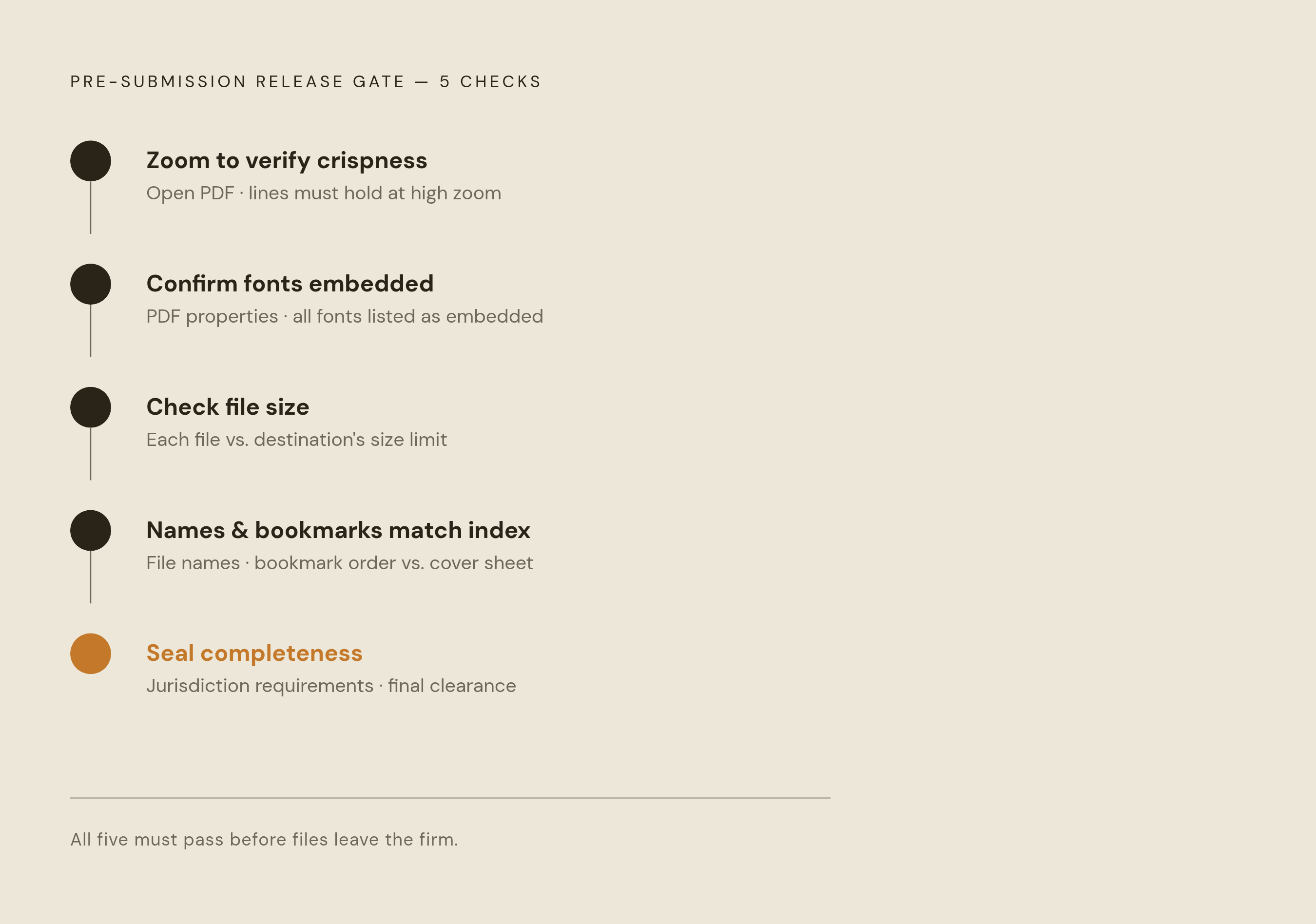
The pre-submission checklist should function as a release gate. First, open the PDF and zoom in substantially to check that lines remain crisp. Then use PDF properties to check that all fonts are embedded, and compare each file’s size with the destination’s limit. Check file names against the cover sheet index and confirm that bookmarks follow the same organization. Finally, review seal completeness against the jurisdiction’s specific requirements before the files leave the firm.
AI-assisted tools can support these checks during production. AEC-focused tools that work within Civil 3D, MicroStation, OpenRoads, Bluebeam, and Microsoft 365 can apply and check standards using a firm’s past projects and requirements, with licensed engineers reviewing all outputs. Their useful role is earlier detection of non-compliance. They do not displace the professional review obligation or the need to configure the correct jurisdictional rules. First-time compliance becomes achievable when those rules guide the work from the outset, rather than arriving as instructions attached to a rejection.
Sources
- CADD Standards TABLE OF CONTENTS
- New York State Department of State Division of Building Standards and Codes
- CADD Standards TABLE OF CONTENTS November 2025 Support
- Location & Design Manual, Volume 3 - January 2026
- Plan Presentation Guide 12/19/2025 Revision 3.1 Atlanta, GA 30308 This document
- Plan Submittal Requirements
- Page 1 Facilities Development Manual Wisconsin Department of Transportation